

Your customer opens your bill. Can they tell, in less than 5 seconds, how much they owe, when it’s due, and how to pay?
If the answers are buried in boxes, small print, and competing information, even a straightforward payment can become unnecessarily complicated.
We compared two statement designs, one that makes a customer hunt for information and the other that makes amounts owed clear and guides customers towards payment. Four design choices make the difference: simplifying, anchoring, using active white space and providing the easy next step.
How to differentiate what works and what doesn’t in your statement
BEFORE: Too much information, not enough direction.
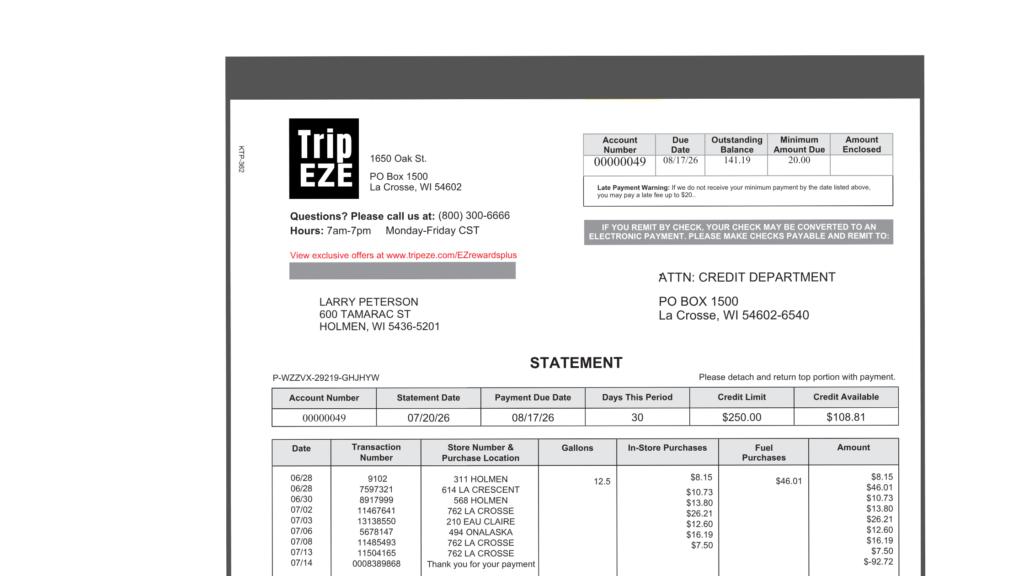
This statement contains all necessary information, but the elements compete for attention. Grey boxes divide the page into equally prominent sections. Text is small and undifferentiated. Credit limits and account details receive the same emphasis as the amount owed. The customer has to search for important information and figure out what to do next.
AFTER: A clear path from balance to payment.
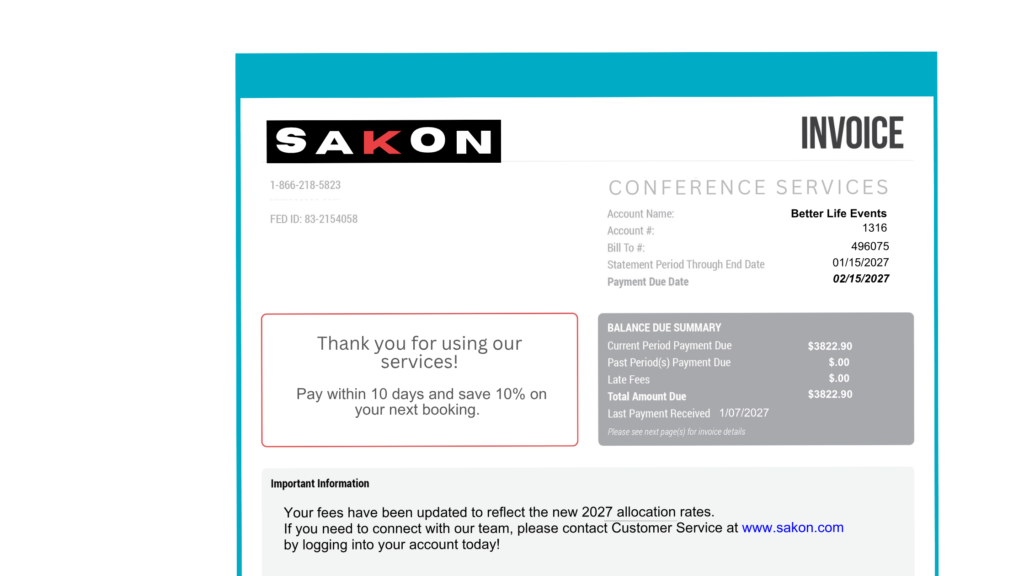
This statement establishes an immediate visual hierarchy. A prominent title of ‘Invoice’ identifies the document. Next in the visual hierarchy is what the invoice is for, ‘Conference Services.’ The amount due and payment date are grouped in the upper right and stand out. Related charges appear together, while payment instructions and important messages have their own defined spaces.
The difference isn’t simply appearance. It’s how quickly a customer can understand the bill and act on it.
Four design elements make a difference.
1. Simplify billing information: The 5 second rule
Every unnecessary box, repeated detail, or confusing label adds work for the reader.
Show important information once. Group current charges, past-due balances, fees, and totals logically. Identify what’s most important with visual hierarchy and color.
Quick test: Hand the statement to someone to look at for five seconds. Ask what they owe and when. If they can’t immediately say, simplify.
2. Anchoring: Leveraging the ‘Z-Pattern’
Good statement design directs attention rather than making readers search. Research shows that most people scan in a ‘Z’ pattern: from the top left across to the top right, diagonally down, then across the bottom, ending at the bottom right.
To apply this to statement design, place the company logo and statement identification at the top left. Make the total amount due and payment date on the top right, and differentiate it with type size, box, or color. Then place the payment area with amount due at the bottom right with similar emphasis.
The Trip EZE statement does put the balance info at the top right, but it’s one small box among several of equal weight, so nothing anchors the eye. The Sakon invoice uses a large ‘Invoice’ title, a bold due date and one bold total, and its coupon puts date and amount in a red bar on the bottom right.
3. Put blank spaces to work
Blank space on your statement isn’t empty. It can be where you tell customers how to pay faster and what to do next.
Use clearly defined areas for account alerts, service updates, AutoPay enrollment, eBilling reminders, or special offers.
Blank spaces also create opportunities for transpromo messaging— adding personalized messages, offers or promotions to transactional documents such as bills, invoices and statements.
Many customers like printed statements but prefer to pay online. A QR code surrounded by sufficient white space can connect a printed statement directly to an online payment portal.
4. What your customer should do next – in a glance
A well-designed statement doesn’t stop at explaining the balance. It makes knowing what to do next and finding those details easy and fast.
Put the amount and due date together in the bottom left. Identify options: online payment, credit card, eCheck, AutoPay, and traditional check options. Make it feel safe with visual trust elements and options for help that put customers at ease.
Use brief instructions and a clearly marked detachable payment coupon when needed.
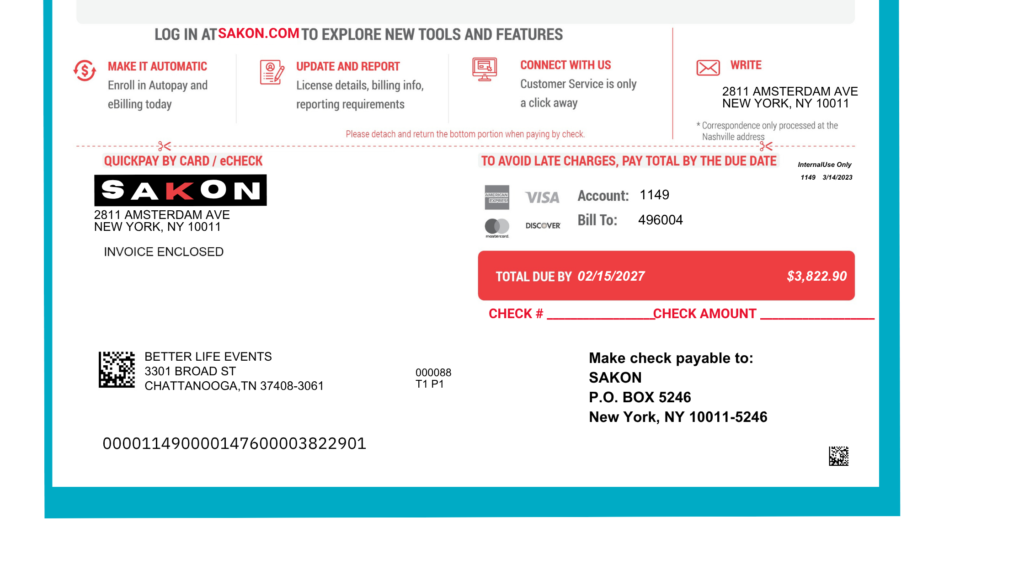
This redesigned example is easy-to-scan while preserving the information required for accurate processing.
Final caveat: Window placement in statement design
If your address block shifts even a fraction of an inch during folding and inserting, it may not line up with the envelope window. The mailed piece then misses automated sorting, which can mean extra postage, delivery delays and returned mail.
That’s where Metro Presort’s expertise can help. We’ll review your statement layout against USPS requirements and check the window placement, so a design that looks great on screen also makes it through USPS compliance. Our automated, barcode-tracked inserting then keeps each piece lined up from start to finish.
Better Statements Start with Better Design
Metro Presort helps organizations turn their statements into clearer, more effective customer communications. From statement design and variable-data printing to production, addressing, and mailing, we can help make every statement work harder.
Ready to give your statements a before-and-after transformation? Contact Metro Presort to discuss your next billing or statement mailing project.